
Crossing at land checkpoints in Singapore before going over to Johor, Malaysia, has a new enhancement — i.e. going passport-less and using QR code in place of passport at the auto-clearance gantries at both Tuas and Woodlands Checkpoints.
The enhancement will speed up the retrieval of personal data via QR code instead of scanning the document (passport) before biometric verification. This is made available to all Singapore passport holders and also foreign travellers who have registered with Singapore Immigrations on arrival.
I applied a QR code for myself and used it at Woodlands Checkpoint to cross to Johor Bahru and back. It is indeed faster for the document scanner to scan the QR code on my mobile phone than to scan or read the RFID chip embedded in the biometric page of the passport.
I am sharing how to apply for the QR code as well as some tips and mistakes to avoid.
Get the QR Code
To get the QR code for immigration clearance at the land checkpoints, follow these steps:
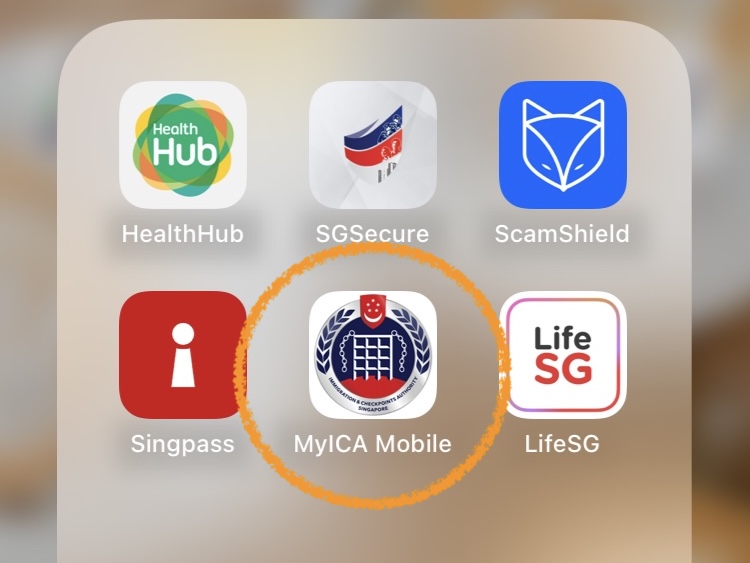
Step 1: Download the official MyICA Mobile app from respective app stores. Launch the app, scroll down to the “Favourites” section and tap on the icon labelled as “QR Code at Land Checkpoints”.
For Singapore passport holders, MyICA app should be kept on mobile phones as it has other functions apart from applying for the QR code for land clearance, such as submissions of SG Arrival Card within 3 days before returning from overseas trips via air and sea checkpoints.
For foreign passport holders, it is mandatory to submit SG Arrival Cards within 3 days before arriving in Singapore regardless of which checkpoint.
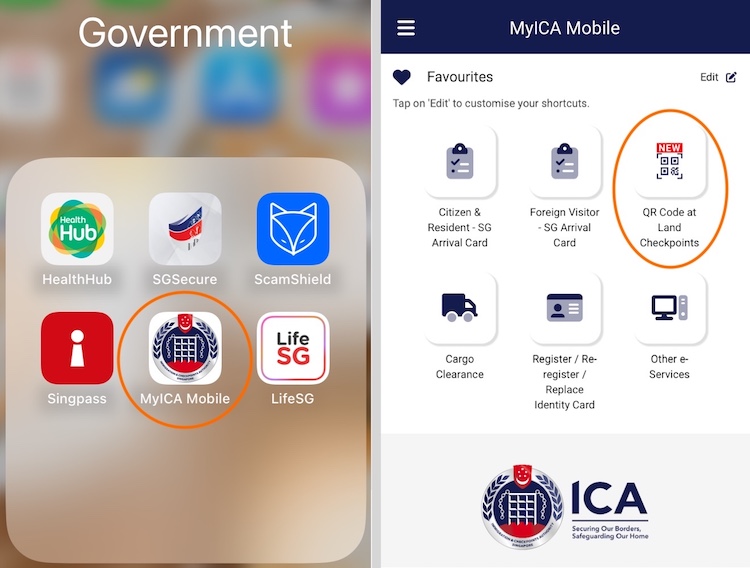
Step 2: To apply for a QR code for oneself, tap on “Individual QR Code”. Use SingPass to retrieve MyInfo for filling in the details automatically or enter all required data manually.
Note: To apply for a group of people, use “Group QR Code”. The maximum number of people allowed per QR code varies depending on the type of transport — car (10), bus (4), lorry (4) and motorcycle (2). The minimum number of people per Group QR Code is 2, of course.
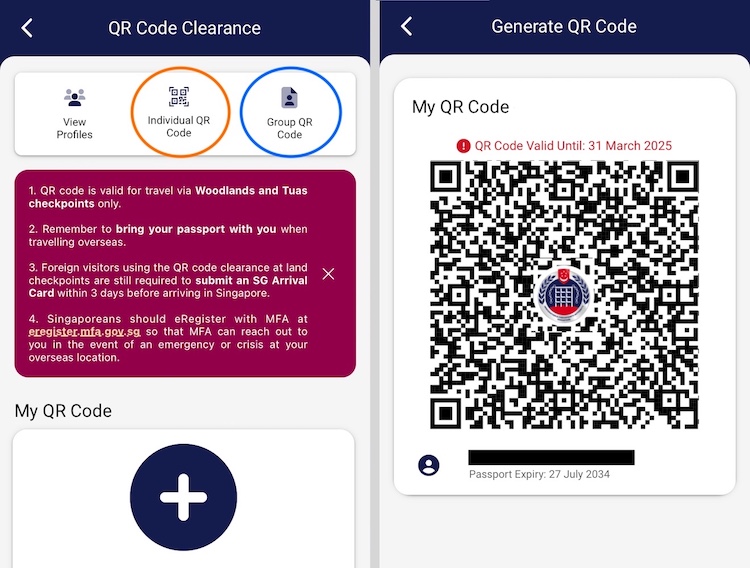
Step 3: A QR code will be generated instantly with an expiry date shown above it. There is no need to re-apply for a QR code on every trip across the land border until the existing code expires after the indicated expiry date — anyway, this will be managed by the app.
And you are good to go!
Use the QR Code at Land Checkpoints
At the automated clearance gantries in Tuas Checkpoint or Woodlands Checkpoint, use the QR code in place of Singapore passport at the very first Document Scanning Stage.
Step 1: Simply launch MyICA app, go to “QR Code at Land Checkpoints” again and tap on the profile under “My QR Code” — or “Group QR Code” — to retrieve the QR Code stored on the mobile phone. The phone will light up brightly when the QR code is presented.
Step 2: If you have a Group QR Code for 2~4 persons, you must find and use the wider gantries for clearing groups. If you have an Individual QR Code, use the narrower gantries for single person — avoid using the wider gantries for group clearance as they tend to be slower when processing a single individual.
Step 3: Find the smaller QR Code Scanner (usually above the Passport Scanner) and let it scans the QR code by placing the phone face-down about 2 inches above the screen. Unlike a passport, the phone’s bright light will reflect on the screen of the scanner if placed flat on it and also focusing issues, thus hindering the reading process — I have seen some people putting their phones flat on the screen and complained that the scanner takes forever to read the QR code, then they started fumbling for their passports resulting in longer delays.
When all is done properly, it will take split- second for the QR Code Scanner to read the QR code and you will be allowed to proceed to the Biometric Verification Stage.
In summary, do use the QR code for speedier clearance at Singapore Land Checkpoints but must remember to bring along your passport for clearance at Johor Customs.
Next:





Leave a Reply